LinkedIn 1st, 2nd & 3rd Connections Explained for 2026
TL;DR:
LinkedIn connection degrees show your relationship proximity: 1st-degree are direct connections you can message freely , 2nd-degree are connected to your connections, and 3rd-degree are three steps away.
Building a large network (up to 30,000 connections) increases visibility, leads, and opportunities through strategic outreach and automation tools.
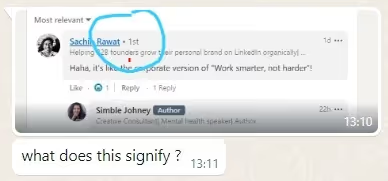
Ever scroll through LinkedIn and see those numbers like 1st, 2nd, or 3rd next to someone's name?
Ever wondered what they mean?
Well, you are not alone. A friend recently hit me up and asked, "What's that all about?"
You might be thinking, "Why ask you?"
Well, I've been building my LinkedIn network for 8 years, and it's now at 7,000+ connections.

So, I helped her out, but it got me thinking that there must be others out there wondering the same thing.
That's why I wrote this blog to tell you:
🌟 What does 1st-degree connection mean,
🌟 What is 2nd-degree connection,
🌟 What does 3rd-degree connection mean, and how to identify them.
🌟 Why do LinkedIn connections matter?
🌟 Plus, I'll also share the secret that helped me grow my LinkedIn network to 7K followers.
So stay with me till the end!
But I won't just throw facts at you. This is a chat between you and me, not a lecture.
So let’s get into it.
What Does 1st Mean on LinkedIn?
Simply put, your 1st-degree connections are your direct connections on LinkedIn.
For example, when you accept someone's connection request, OR someone accepts yours, you get directly linked to them on LinkedIn and become 1st-degree connections to each other.
How to identify a 1st-degree connection?
It's easy; you will see the "1st" icon next to their name.
You CAN interact with your 1st-degree connections by sending them unlimited LinkedIn messages without any restrictions or extra fees.
The biggest advantage of a 1st-degree connection on LinkedIn is that you can message them directly and access their emails, phone numbers, website, and other relevant contact details.
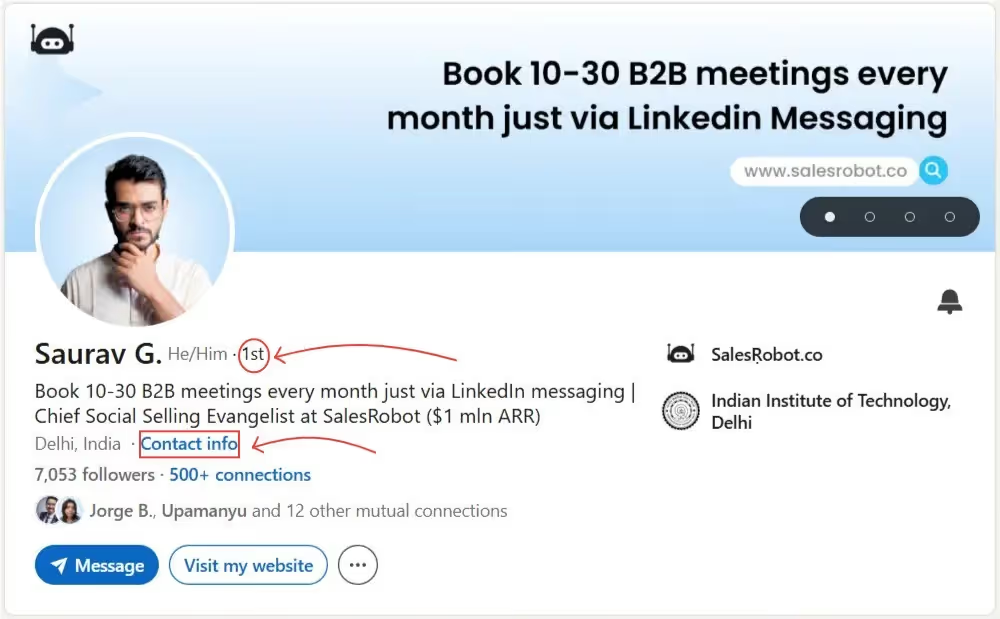
To fetch their contact details, click on the "Contact info" option, and a pop-up will appear with their information. Your contact information is only visible to your 1st-degree connections by default, giving you maximum access to each other's professional details.

That's why sending a connection request is highly important while prospecting on LinkedIn . You can message them on LinkedIn or easily email them.
What does 2nd mean on LinkedIn?
2nd-degree connections refer to people who are connected to your 1st-degree connections.
These people are connected to someone you know - someone you don't know, but one of your friends knows them.
How to identify a 2nd-degree connection?
On their profile, you'll see a little "2nd" icon that lets you know they're your 2nd-degree connection. You are allowed to see their profiles and even send them connection requests by clicking the Connect button on their profile page.
Note:
You can also see all the people you have in common with them!
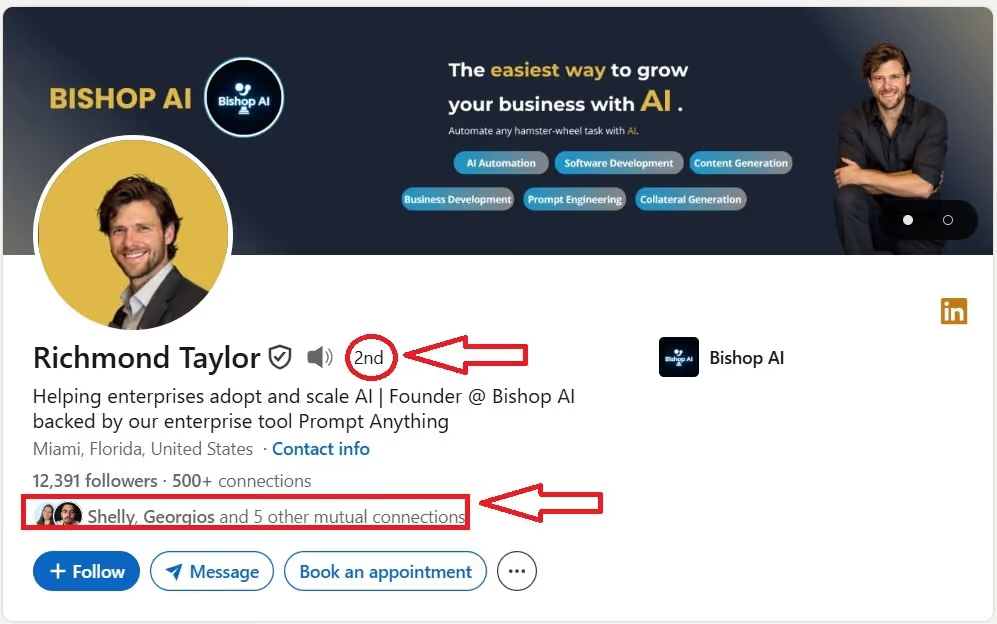
Remember, you cannot directly message your 2nd-degree connection, and you can get the contact details, such as Website only from their LinkedIn profile.
To initiate a conversation with them, first, send them a connection request on LinkedIn.
BUT… this process is time-consuming, and what if they DO NOT accept your connection request?
In that case, you can use LinkedIn InMail to reach out to your 2nd-degree connection only if they allow you to send one.
What Does 3rd Mean on LinkedIn?
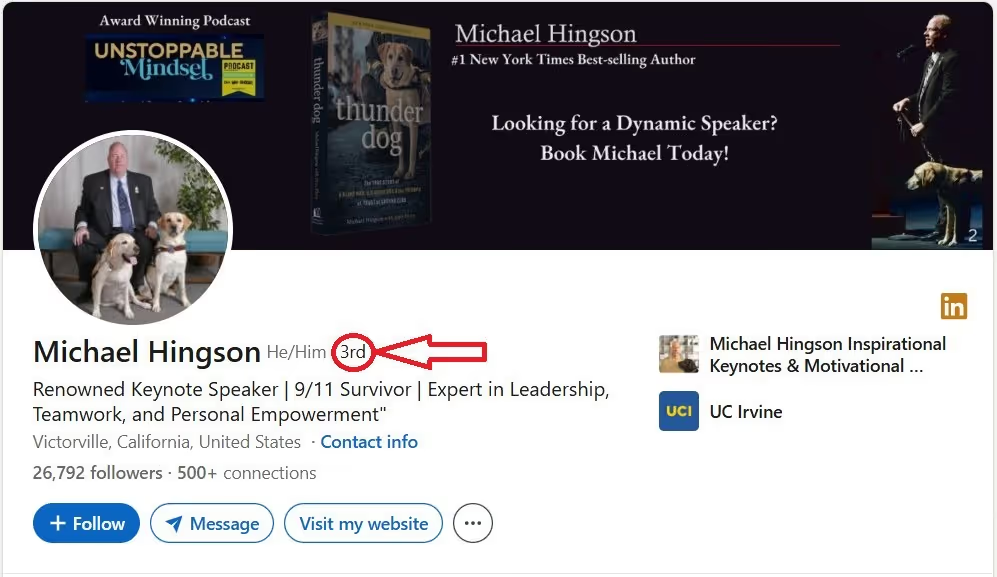
3rd-degree connections refer to people connected to your 2nd-degree connections.
Like 2nd-degree connections, you can neither get in touch with LinkedIn 3rd-degree connections through LinkedIn messages, nor can you fetch their contact information from their profile.
If you want to reach out to your LinkedIn 3rd-degree connections, you can use LinkedIn InMail or message them via LinkedIn Group and Event. (if you share a common group with them)
Here are 12 InMail templates for you to try.
What Are "Out Of Network" Users?
Out-of-network LinkedIn Members are individuals who are not connected to you through your 1st, 2nd, or 3rd-degree connections and with whom you do not share a common group on LinkedIn.
You have limited visibility on their profiles, and you may not be able to see their profile at all. If someone is too far out of your network, they may also be referred to as "LinkedIn Members" on the platform.

To interact with these members, you can use the LinkedIn InMail feature, which allows you to send messages to individuals you are not directly connected to, including "LinkedIn Member" profiles.
Now you know what each degree of connection means and how to identify them.
But there's still one very important question that we need to address: "Is there an advantage to having a large number of LinkedIn connections?"
Let's find out…
Do Connections on LinkedIn Matter?
The answer is, "YES, LinkedIn connections matter."
And here are 3 reasons why:
-
Getting more inbound leads if you're active on LinkedIn and gain followers.
-
Getting more outbound leads through strategic networking as you connect.
-
Getting job opportunities .
So, it makes sense to start focusing on expanding your LinkedIn network.
What Happens When You Get 10,000 Connections on LinkedIn?
You’ve hit the 10k mark on LinkedIn? Congrats!
Here's what it could mean for you:
🌊 Your inbox could get flooded with leads.
🗣️ Recruiters won't stop reaching out to you for new job roles.
🎫 Big brands would approach you for paid endorsements.
I'm just kidding, but seriously, building a large LinkedIn network opens so many doors.
You get more leads, inquiries, and business.
Plus, the 10K mark screams influence and expertise - your credibility skyrockets.
More connections also mean more eyeballs on your content. To make money from this, you can hit up your connections directly or create a sales pipeline with webinars, free trials, courses, and such.
Also, your posts don't just stop at your immediate connections; they extend to their networks, too.
Having 10k 1st-degree connections means you have at least 1M 2nd-degree+ connections. LinkedIn shares your post with all of these people.
But it also pays to remember that it's not just about numbers. It's also about the quality of those connections.
So, how do you build a high-quality and large network on LinkedIn?
What are The Maximum LinkedIn Connections?
Ok, before we get to that, here's a quick quiz.
What do you think is the LinkedIn connection limit for 1st-degree connections?
A. 20,000
B. 30,000
C. 50,000
D. 100,000
Done?
Now, let's find out if you were right.
If you picked option B, then bravo! You're right!
LinkedIn has a limit on the number of direct connections you can have, which is currently 30,000 1st-degree connections .
This restriction is in place to ensure a high-quality professional network and prevent spamming or unwanted connections.
While there is a limit to the number of 1st-degree connections you can have, the number of people who can follow you (and who you can follow) is unlimited.
If you have reached 30,000 connections, Follow will become the default option on your profile.
Did you know 🤔 LinkedIn has a network size limit?
If you don't switch, it will be shown in your LinkedIn profile automatically once you reach 30,000 connections.
How to Grow a LinkedIn Network to 10k Connections with Automation
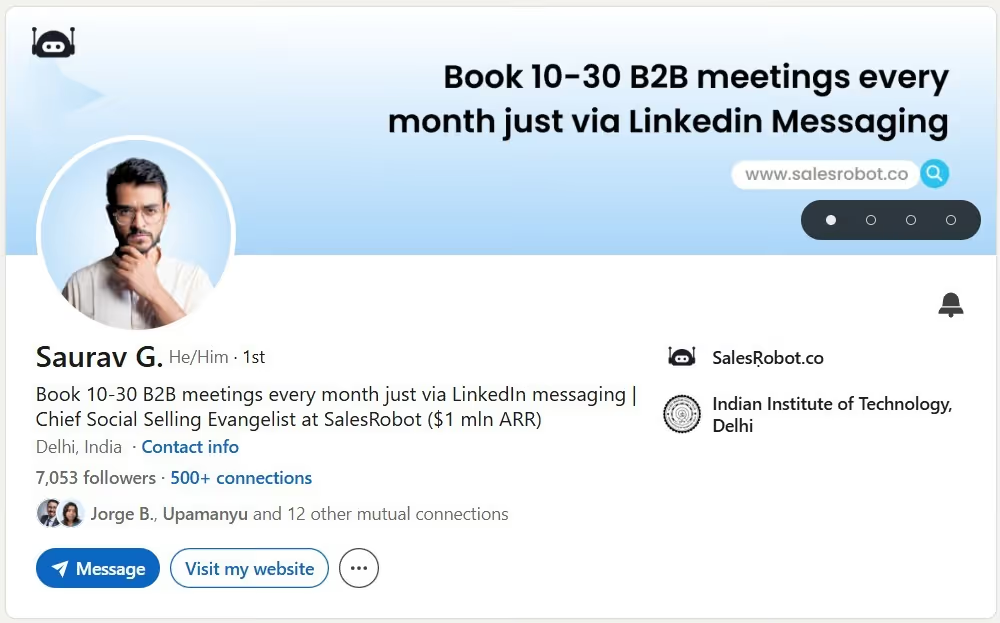
Alright, we are finally here!
I know you've been waiting for this, so let me spill the beans right away!
Here is my secret: I send as many connection requests as possible.
That's it. And you can do it, too.
All you need is a Google sheet with 3 columns:
A. "Date"
B. "Person to Connect With"
B. "Request sent"
Have a daily target of sending at least 10 requests.
But… this sounds like a time-consuming and boring process. I know. And that's why I am even going to share a hack that helped me scale to 10K connections without repeating the same task again and again, in the next section.
How to Automate LinkedIn Connection Requests
Before I reveal the hack, can we have the drum roll, please?
You gotta automate everything! That means automating every step of the process, like making a list of people you want to connect with, checking out their profiles, writing a personalized request, and sending it.
And you can do it with Outly .
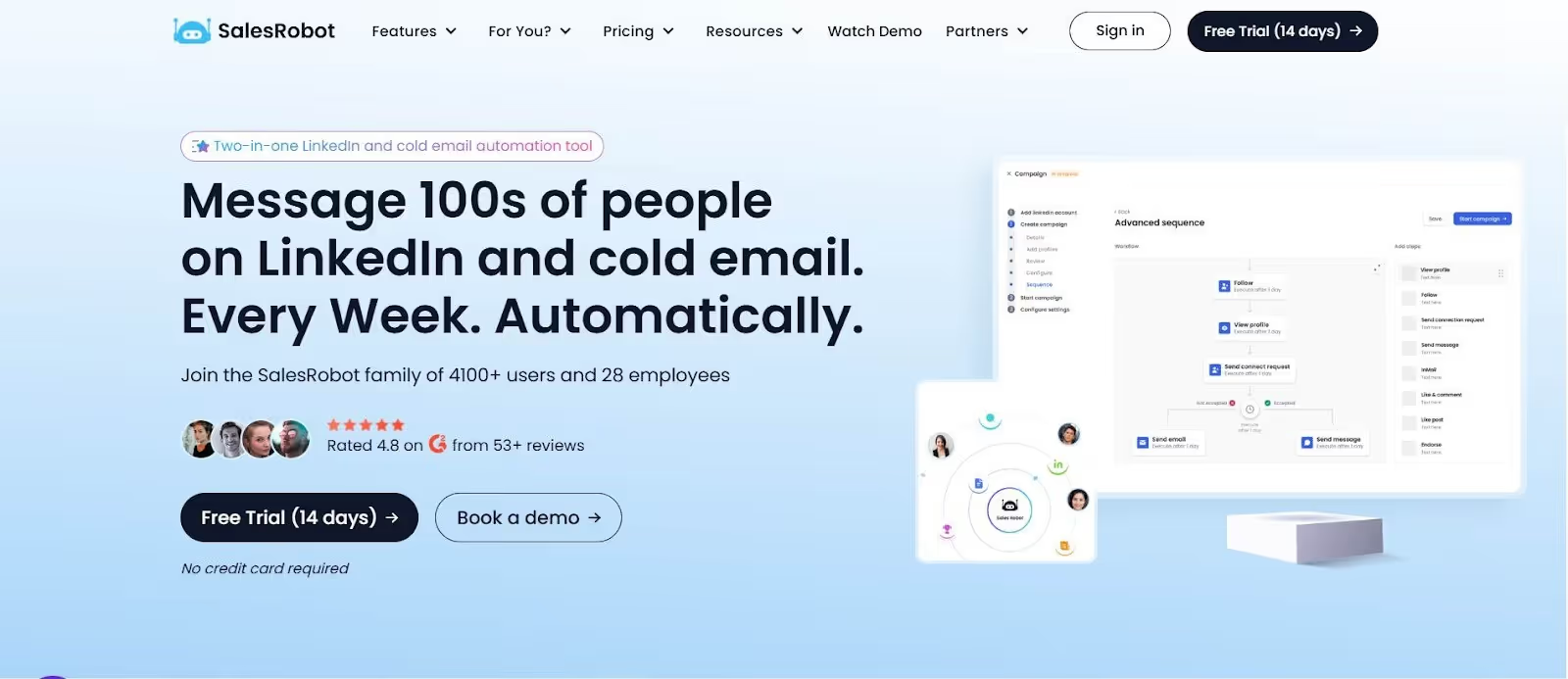
So, what's Outly?
Outly is an AI-powered bot that takes over your manual work of sending connection requests, writing a message, following up with your prospects, responding to leads, and booking meetings without lifting a finger through their AI Appointment Setter feature.
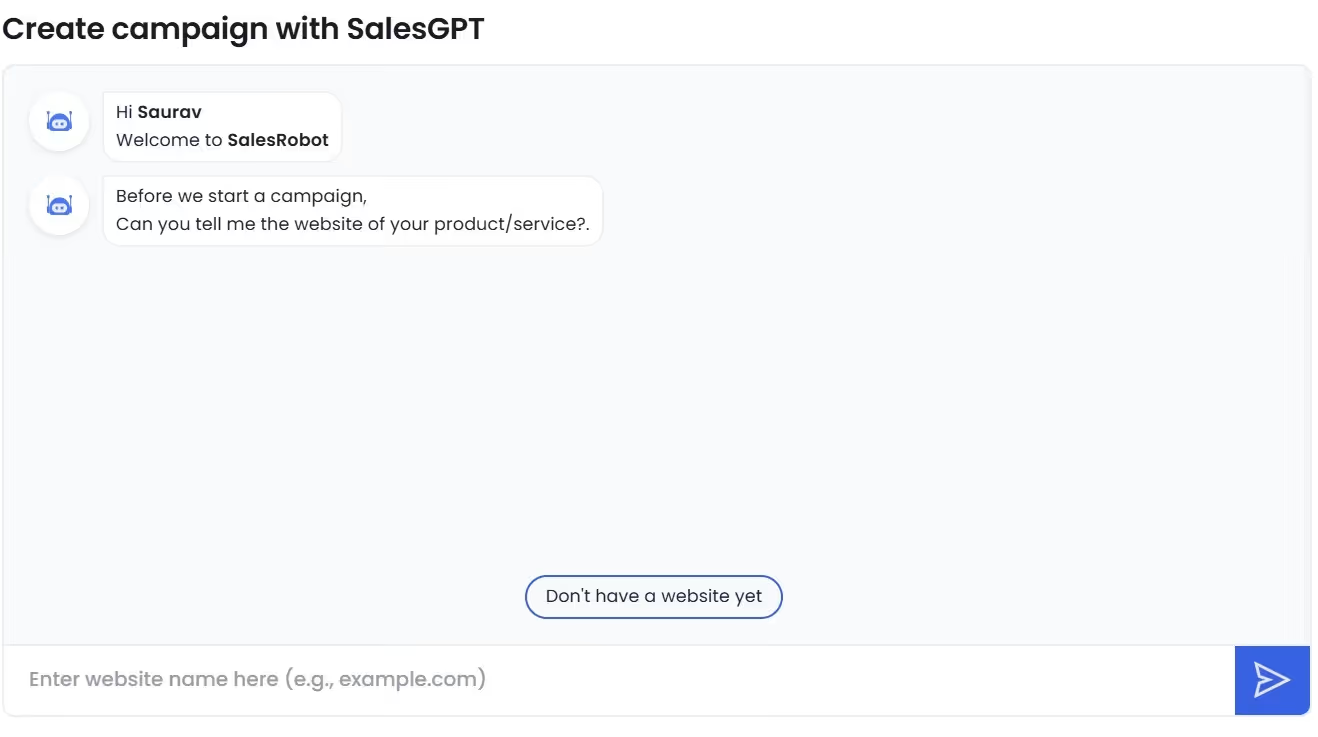
SalesGPT takes the setup even further. Describe your target audience in plain English, and it builds your entire outreach campaign in under 5 minutes.
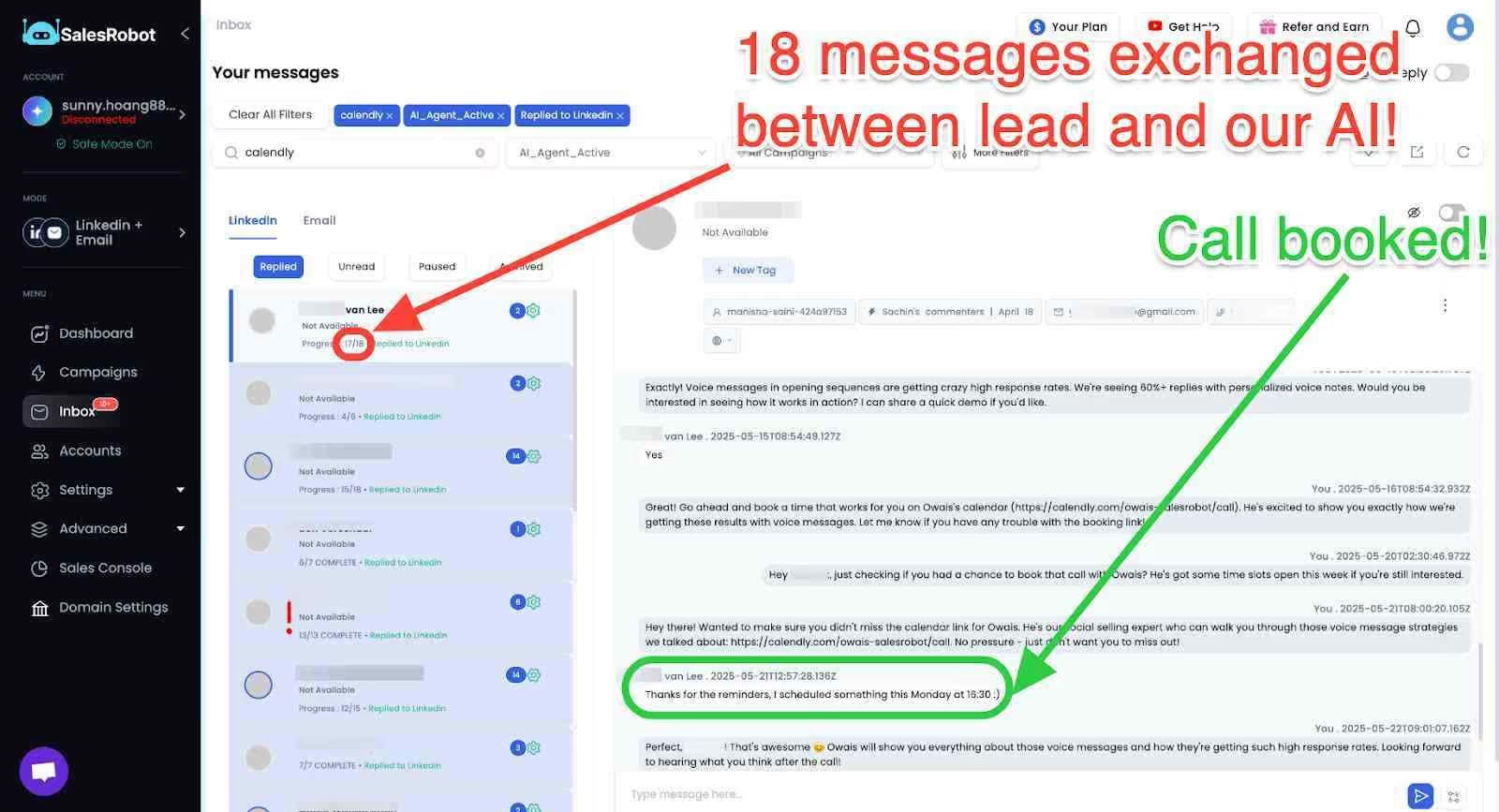
It automatically stops sequences the moment a prospect replies, so you never send a follow-up to someone who's already responded through the Smart Reply Detection feature .
Additionally, Outly now offers AI-powered voice and video messages .
They send personalized voice notes and video messages at scale.
This is done using AI voice cloning and AI video avatar messages used inside LinkedIn outreach.
According to Outly's internal data, this feature alone drives 40%+ reply rates by making text-heavy inboxes feel personal again.
This will help you save time.
The time that you can spend with your family.
Time that you can use to brainstorm strategies to scale your business.
If you're interested but don't want to commit, take the free 14-day trial . Just your email, and you're good to go!
How to Reach All 1st-Degree Connections on LinkedIn?
Recently, I was reading "The $100 Startup," and there was this line that has stuck with me ever since. It was "Growing a business isn't as hard as getting the first sale."
I second that opinion because no one is crazy enough to give $1000 to a beginner and a stranger. Would you?
So, how do you get your first client?
Well, you simply reach out to your 1st degree connections on LinkedIn.
Here's how to do it:
-
Open your LinkedIn Profile and click "My Network"
-
Click "Connections"

Now you can see all your connections.
- To message them, click on "Message" next to their profile
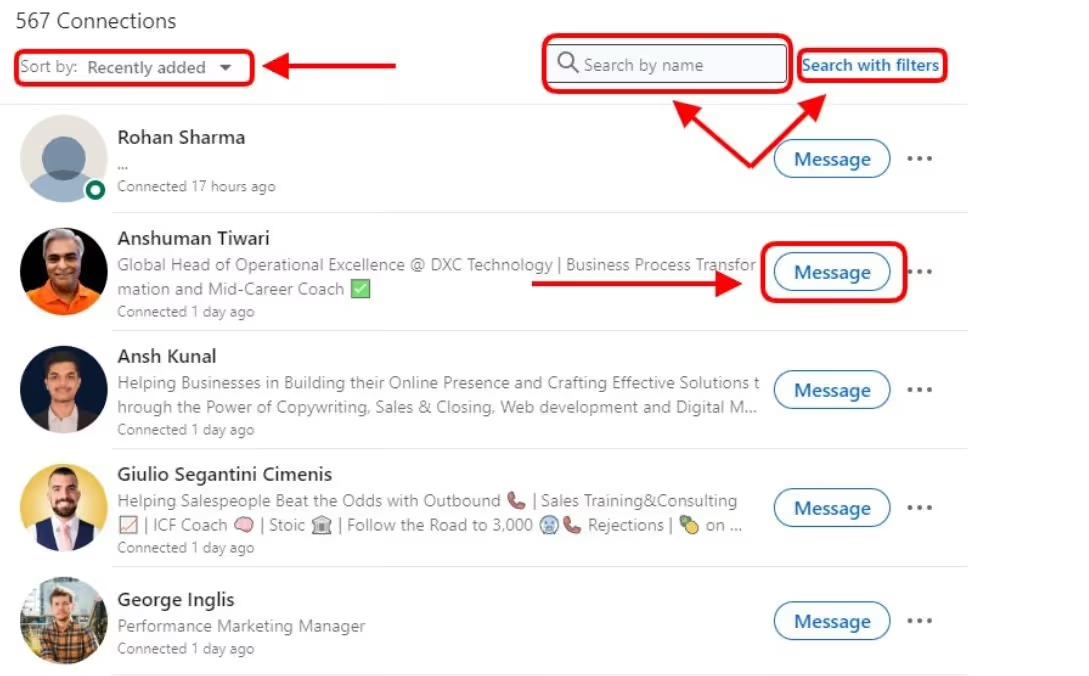
You can sort connections and also search by name or search with filters.
Also, everyone gets busy, so you need to follow up after the initial message.
But this will take you hours, and if you want to save hours, use Outly to reach out to all of them in less than 2 minutes.
Here's how:
-
Click "Me" and "View Profile"
-
Click on "Connections"
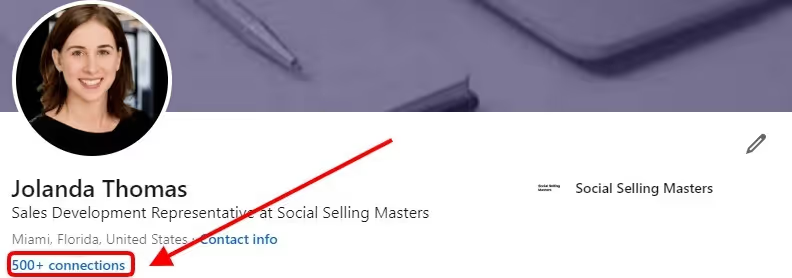
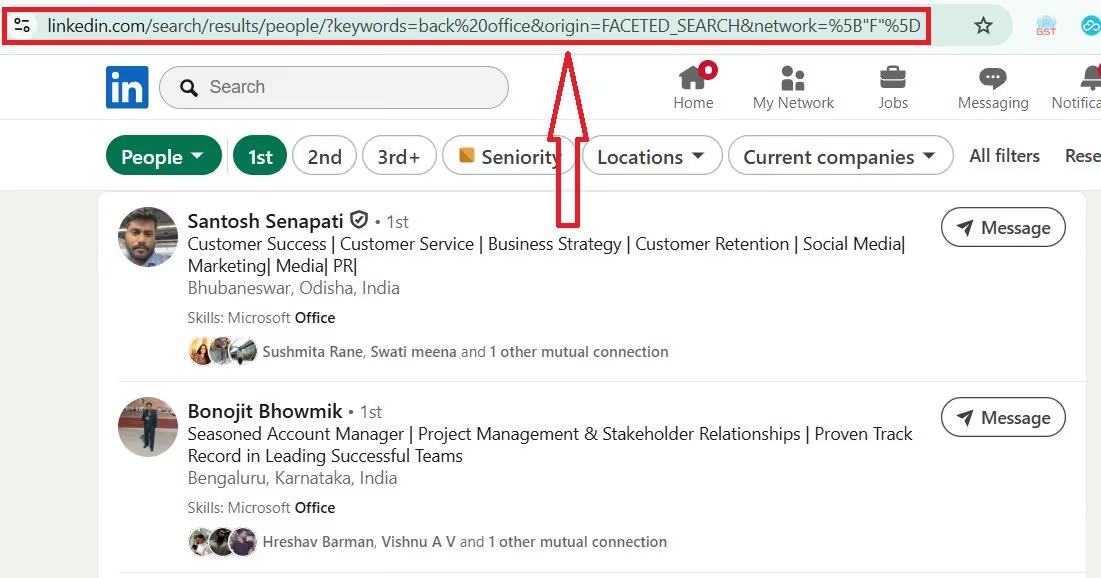
- Copy the search URL
- Log in to your Outly account and create a "LinkedIn Search" campaign
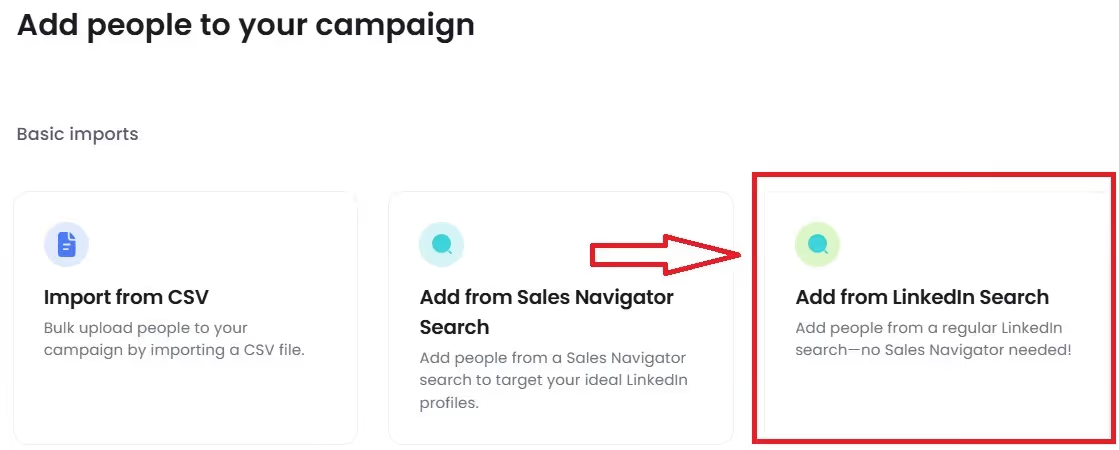
-
Paste the URL
-
Create a message from scratch and click "Send message."
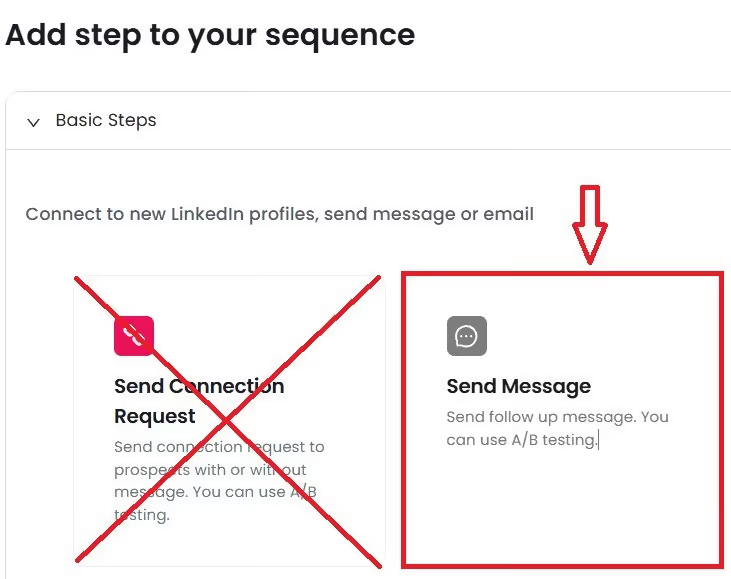
Please note:
You don’t need to send a connection request because you’re already connected.
- Save it
Done! You created a 1st-degree networking campaign in less than 2 minutes.
How to Reach All 2nd+ Degree Connections on LinkedIn?
Now, if you have already reached out to your 1st-degree connections and are looking to get more leads via strategic networking. Your ideal next step is to reach out to all 2nd+ degree connections.
For that, you must know your ideal customer.
It could be anyone from a CEO, VP of sales, VP of marketing, Business owner, etc.
Next, all you have to do is search on LinkedIn and click on "People".
And filter them based on connections. (Chose 2nd and 3rd+)
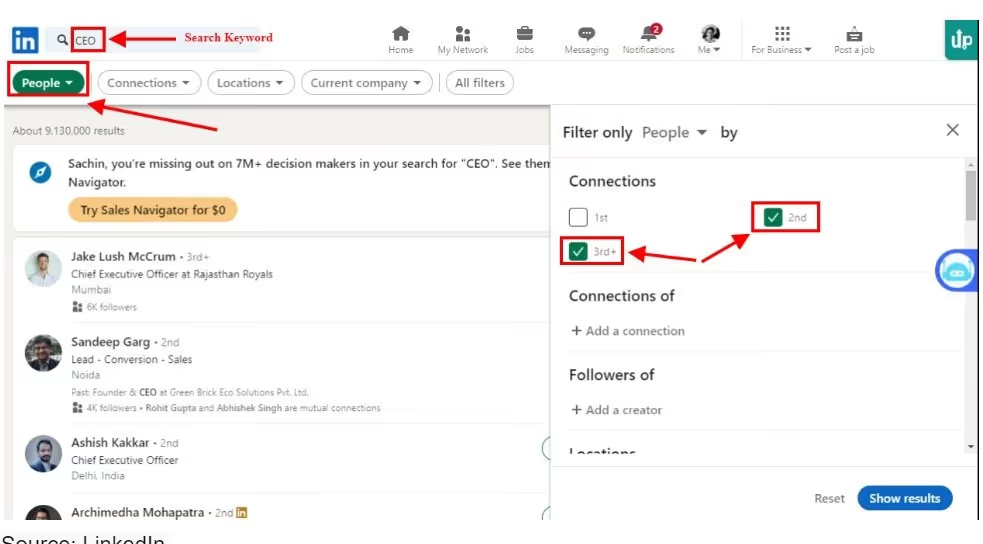
To reduce the search results, you can apply more filters.

Now, you can start reaching out to them one by one.
But then again, it's a boring job.
Instead, let Outly take over for you and reach out on your behalf to all the prospects.
All you have to do is copy the search URL, log in to Outly , create a "LinkedIn search" Campaign, and paste the URL as shown in the previous section.
But this time you'll be sending a connection request too.
All you have to do is click on "Send Connection Request" while creating a message.
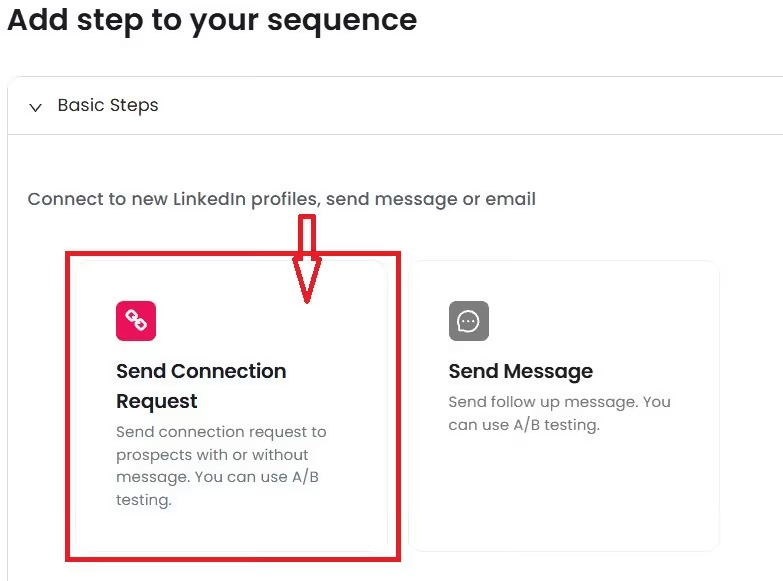
You have the option to send connection requests with a message or send them blank.
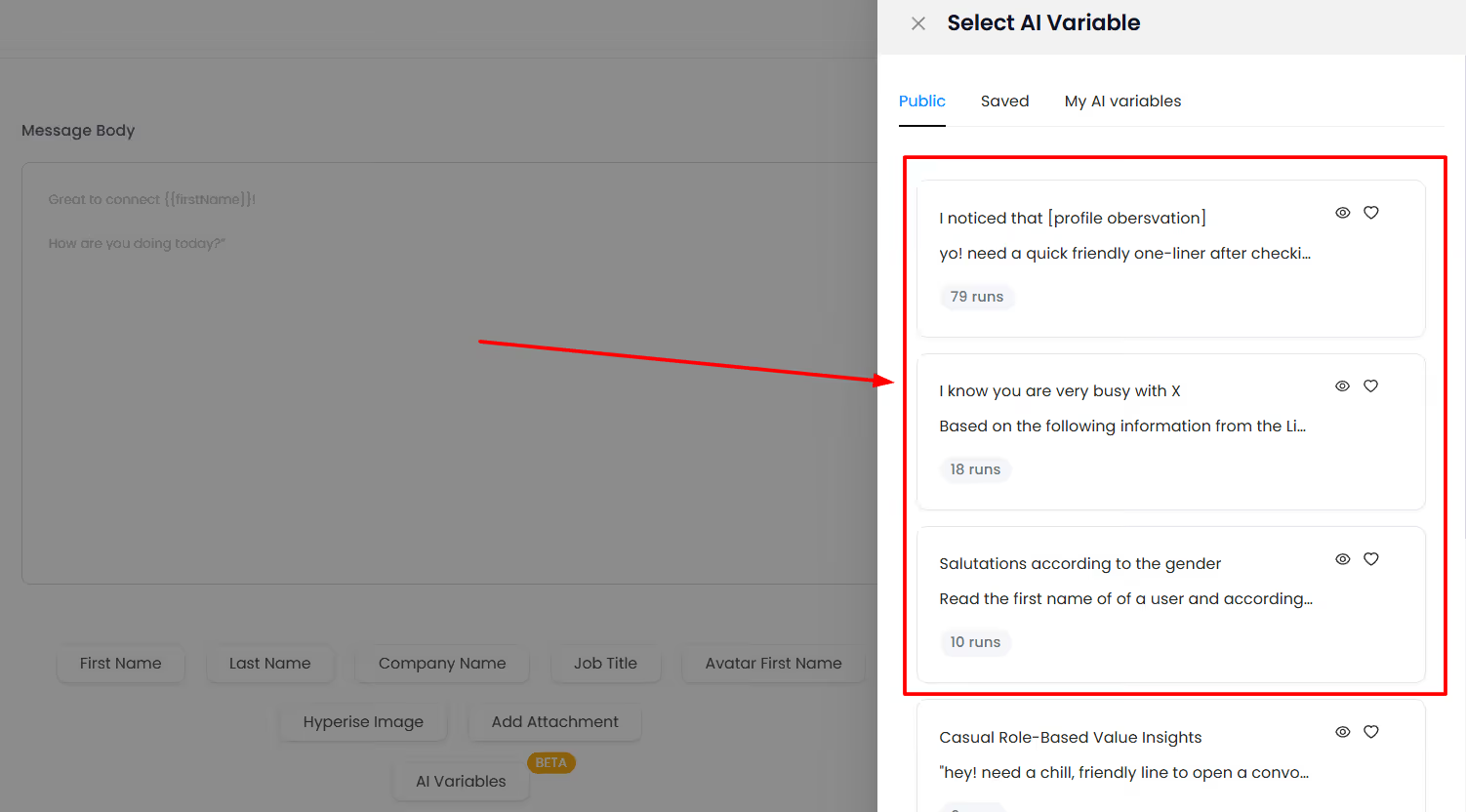
Also, you can personalize with basic tags such as "First Name," “Last Name,” "Company Name," "Job Title," “Avatar First Name,” “Hyperise Image,” “Add Attachment,” “AI Variables.”
Outly supports AI Variables, which pull live data from LinkedIn profiles to write hyper-personalized lines for each prospect automatically.
And just like that, you can reach out to all 2nd+ connections.
How To Bypass LinkedIn Invite Limit On Sending Connection Requests?
You're on your way to building a solid network on LinkedIn, but LinkedIn MIGHT ban you if you send too many connection requests.
LinkedIn imposes a limit of 100 connection requests/week. At this pace, it'll take you years to reach the 10k mark.
But, there is 1 method to bypass the LinkedIn connection limit:
Open profile:
This is one of the underrated prospecting strategies .
You can connect with any open profile without sending a connection request.
You can send InMails to an open premium profile.
To send Emails, you need to have a LinkedIn Premium subscription, such as LinkedIn Premium, LinkedIn Sales Navigator, or LinkedIn Recruiter.
Why Can't I Connect with Someone on LinkedIn?
Sometimes you might face issues when trying to connect with someone on LinkedIn. Here are the most common reasons:
Connection limits: LinkedIn notices if you are contacting beyond your 2nd and 3rd degrees of connection and may prohibit further requests.
Privacy settings: The person may have restricted who can send them connection invitations. You can control this in your privacy settings under "Data privacy" and select "Invitations to connect" under the "Who can reach you" section.
Profile restrictions: Some profiles have limited visibility, especially if they're far outside your network.
Conclusion
You've read till the end! Yippee! Thanks for sticking around.
Before we say goodbye, let's do a quick recap of what we just accomplished:
-
You now understand the WHAT behind 1st, 2nd, and 3rd-degree connections and even out-of-network connections.
-
You have the answer to the most frequently asked question: 'Do LinkedIn connections matter?'
-
Last but not least, you now know my secret (which is no longer a secret) that helped me grow my LinkedIn network to 10K.
If Outly catches your attention, you can check out our website .
Outly helps you message 100s of people on LinkedIn and Email automatically. It's one of the safest LinkedIn and Email automation tools out there. You get 100s of leads each month, consistently. (The best part? You can even bypass LinkedIn connection limits!)
If you're interested, we offer a completely free 14-day trial . Just your email, and you're good to go!
Until next time.
See ya!
Wow your leads by cloning yourself and sending personalized videos and voice notes to each lead on LinkedIn.
If you don't reply to leads within 5 mins, your chances of converting them fall by 50%. Our AI replies on your behalf instantly! (and yes, you can train it)
Don't shoot in the dark. Get detailed analytics on what's working
Outly allows you to invite other team members, so that they can add their LinkedIn Account, run outreach campaigns and get amazing results just like you.